Beta Status: This feature is currently still in beta phase. Please consult our support team to check if your feed is configured properly.
Dynamic Seamless Ads (DSA) combine the familiar, non-intrusive user experience of our Seamless Ads with the power of real-time automation. DSA allows you to dynamically populate all elements within a Seamless ad directly from an external product- or content feed. Based on this real-time data, Seamless ads can be automatically personalized and tailored to the context and profile of the DPG Media visitor.
When to use Dynamic Seamless Ads?
Dynamic Seamless Ads are ideally suited for advertisers with a rapidly changing assortment, variable pricing, or large product / location portfolios.
Example Use Cases
Retail & E-commerce: Automatically display the right smartphone, apparel combination, or daily deal, including the most up-to-date inventory status and price (e.g., "From €799.00").
Audience-Targeted Creative Variation: Tailor your ad creatives directly to the visitor's profile within a single campaign. For example, a fashion retailer running a brand campaign can automatically serve men's shoes to male visitors and women's shoes to female visitors.
Automotive & Localized dealership: Dynamically switch between different car models (e.g., Toyota Yaris or Volvo XC40) based on the reader's interest, or dynamically insert the nearest dealership name and location directly into the ad copy.
Travel & Leisure: Promote last-minute vacation deals where destinations and starting prices are loaded in real-time based on current availability.
How-to
Smart Fallback & Hybrid Formatting:
To create a Dynamic Seamless Ad in Ad Manager, you link an external product feed url from Channable or Pexi. This feature is available within the Ad studio, while creating one of the supported formats. At this moment the following Seamless ads formats are supported for dynamic:
Seamless Image
Seamless Carousel
Seamless Collection
Seamless Listing
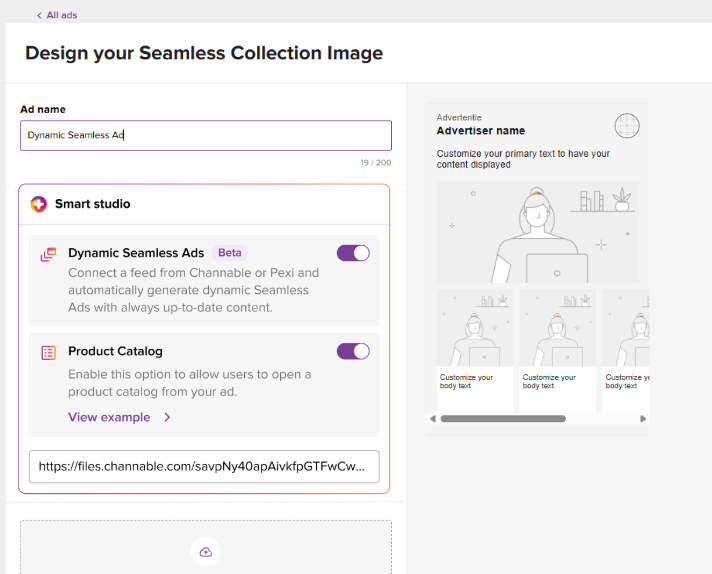
After you added the JSON-url from Channable or Pexi, you are required to set up this ad as a fully static asset. This static configuration serves as your default ad.
The DSA system applies a smart fallback mechanism: if a specific field or attribute is not populated in the feed (or if the feed is temporarily unreachable), the system automatically falls back to the data entered into the Default Ad in Ad Manager.
This mechanism provides enormous flexibility. You can choose to build your creative as a hybrid asset. For example, you can choose to dynamically pull only the description and price from the feed, while keeping all other elements (such as the logo, main title, and image) static as defined in the default ad.
Targeting & Segmentation via the feed
In addition to continuously updating your offerings, utilizing a feed makes it possible to adjust the creative in real-time based on visitor targeting.
Supported features: You can deliver ad variants based on our standardized ratecard audiences. This includes Audience targeting (Gender/Age, Detailed targeting) and Location targeting. To activate this correctly, you must copy the exact audience or location name from the official DPG Segment list.
Currently unsupported features: Targeting based on CRM audiences, Dynamic Retargeting (showing specifically viewed products on your website), and Contextual targeting is not yet supported in this phase.
For more information on how to implement targeting see here.
Step 1: Setting up your Feed (Channable or Pexi)
Currently, DPG Media accepts feeds generated via Channable and Pexi.
Important: Only JSON feeds are currently supported. We expect to add support for Google Spreadsheets and XML feeds during the second half of 2026.
Are you using Channable? Follow these steps:
Log in to your Channable account.
Navigate to Channels in the left menu and click Add feed.
Search the list of export channels for DPG Media and select this partner.
Follow the built-in setup wizard to map your internal product fields to the required DPG attributes for your chosen Seamless Ads format. (see our Feed attributes for a clear overview per format)
Step 2: DPG Feed Attributes & Strict Specifications
To ensure proper rendering across the DPG Network, your feed must strictly adhere to the structure, image formats, and character limits outlined below.
Text fields must be supplied as Strings,
Numerical values as Integers/Numbers.
Empty optional fields should be passed as null or omitted entirely.
Crucial Guidelines for Text & Imagery:
Incorrect image formats are not allowed. Supplying incorrect aspect ratios or resolutions can result in your creative being immediately rejected by the system.
Character limits are absolute. If a text contains too many characters, it will be hard-truncated at the exact maximum character count, without ellipses (...). This means your sentence could cut off abruptly mid-word. Fortunately, Channable will display a real-time warning if you exceed a limit.
Feed attributes:
Required Base Element
Unique ID: Unique identification number per product or item.
Format-Specific Fields & Image Specifications
See Feed attributes for a visual overview of which fields to use per Seamless ad format. Or see Feed specs for a complete overview of all supported fields.
Maximum file size per image is 2MB, supported formats: JPEG, PNG)
Given resolution is a recommendation. Minimum resolution is 360px width, maximum 1440px width.
For targeting and filtering use the exact audience or location name from the official DPG Segment list.
Step 3: Linking your Feed in DPG Ad Manager
Once your Ad Manager account has been whitelisted and your JSON feed is live, link it within the platform by following these steps:
Open DPG Ad Manager and create a new creative under 'Ads'.
Choose your preferred static Seamless format (e.g., Seamless Collection or Seamless Image).
Paste your JSON feed URL provided by your feed management platform into the input field.
Complete the static ad details (this maps your mandatory Default Ad).
Click Create ad to save the ad. The system will instantly check whether the feed structure and asset ratios comply with requirements. If not, you’ll receive an error message.
For more information, please see the Dynamic Seamless Ads FAQ.
Was this article helpful?
That’s Great!
Thank you for your feedback
Sorry! We couldn't be helpful
Thank you for your feedback
Feedback sent
We appreciate your effort and will try to fix the article