FAQ: Why am I not measuring conversions?
If your conversions aren't appearing in Ad Manager and your conversions are still pending, there could be several reasons. Follow this step-by-step troubleshooting guide to identify the issue and find out how to resolve it.
Check your conversion setup
1. Have you created a conversion?
Before you can measure conversions, you need to create a conversion in Ad Manager.
No: Create a conversion in Ad Manager.
Yes: Continue to question 2.
2. Have you linked the conversion to a display campaign?
Your conversion must be linked to the display campaign you want to measure.
No: Link the conversion to your display campaign. Continue to question 3 to confirm all necessary steps.
Yes: Continue to question 3.
Check your campaign activity
3. Are your campaign, ad group and ads active?
Your campaign, ad group and ads must be active to generate traffic and conversions.
No: Activate the relevant campaign, ad group or ads. Continue to question 5.
Yes: Continue to question 4.
4. Is your campaign or ad group measuring clicks?
Ad Manager attributes conversions to visitors who have clicked your ad.
No: Conversions can only be measured after someone clicks your ad. Make sure your campaign is delivering and generating clicks.
Yes: Continue to question 5.
Check your tracking configuration
5. Are you using third-party ad tags?
Third-party ad tags may require additional configuration to support conversion tracking.
Yes: If you're using Google Campaign Manager 360 (CM360), consult the CM360 documentation for the required click-tracking configuration. For other third-party platforms, contact Support.
No: Continue to question 6.
6. Have you added the tracking token to your landing page URL?
To attribute conversions to ad clicks, your landing page URL must include the following parameter:
token=${SSP_DATA}For example:
https://www.example.com/?token=${SSP_DATA} or https://www.example.com/?utm_campaign=mycampaign&token=${SSP_DATA}
No: Follow the instructions for adding the tracking macro to your landing page URL.
Yes: Continue to question 7.
7. Have you implemented the server-side Google Tag Manager (sGTM) template?
The DPG Media server-side GTM template is required to send conversion events.
No: Implement and configure the DPG Media server-side GTM template.
Yes: Continue to question 8.
Verify your tracking implementation
8. Is the tracking cookie being set correctly?
You can test whether the tracking token is stored correctly in your browser.
Add
token=123to your landing page URL.Open the modified URL in a new incognito window.
Give consent for tracking.
Open your browser's Developer Tools and navigate to the Cookies section.
Check whether the following cookie exists:
xandr_token=123Yes: The tracking token is being stored correctly. Continue to question 10.
No: Continue to question 9.
9. Does the cookie appear after refreshing the page?
After giving consent, refresh your landing page and check for the xandr_token cookie again.
Yes: the DPG Media tag may only be triggered on the initial
page_viewevent. Make sure the tag also fires when consent is updated, rather than only onpage_view. It's easier to let the tag listen to all events and specify for which events you want to measure the conversion.No: Check your GTM configuration and make sure the DPG Media tag has a trigger that fires when consent is updated.
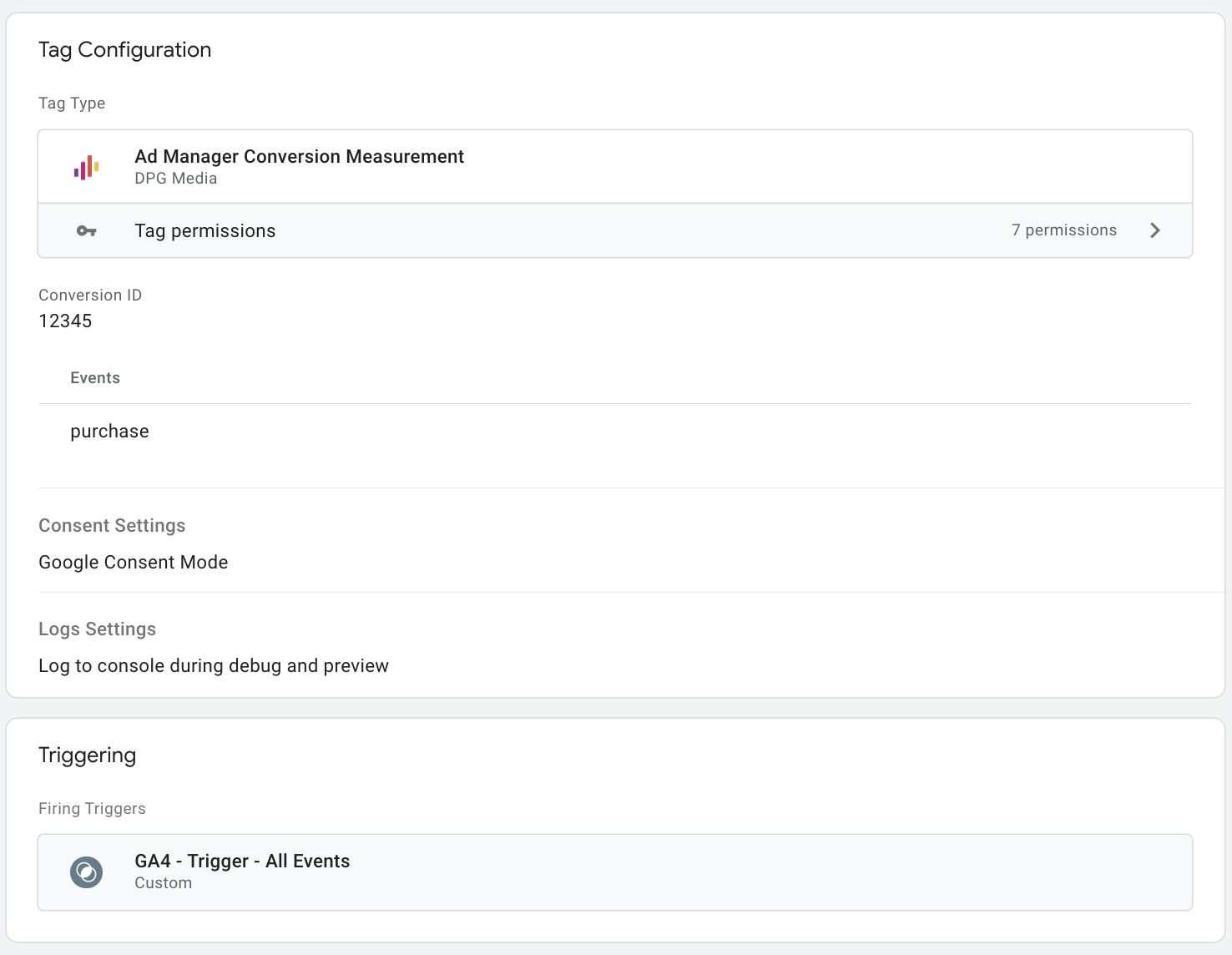 After making changes, repeat the test in question 8 to verify that the cookie is set correctly without refreshing the page.
10. Is the DPG Media tag sending conversion events?
If the tracking cookie is being set correctly, verify that your conversion events are being sent.
Open Google Tag Manager in Preview/Debug mode.
Perform an action on your website that should trigger a conversion, such as submitting a form or completing a purchase.
Check whether the expected conversion event appears in the GTM debug console.
Verify that the DPG Media tag fires and sends an HTTP request when the conversion occurs.
Is the conversion request being sent?
No: Your conversion event or trigger may not be configured correctly in GTM. Review your event configuration, tag conditions and triggers to ensure the DPG Media tag fires for the expected conversion event.
Yes: Your conversion request is being sent. If conversions still aren't appearing in Ad Manager, contact Support for further investigation.
Still not measuring conversions?
If you've completed all the steps above and conversions are still missing, please contact Ad Manager Support.
To help us investigate your issue, include your campaign ID, conversion ID, the troubleshooting steps you've completed and any relevant results from GTM Preview/Debug mode.
Was this article helpful?
That’s Great!
Thank you for your feedback
Sorry! We couldn't be helpful
Thank you for your feedback
Feedback sent
We appreciate your effort and will try to fix the article