These instructions will help you track conversions client-side.
If you are looking for tracking server-side conversions, read this article.
Possible, But Not Recommended
If server-side measurement is not possible, a client-side solution is also possible but NOT RECOMMENDED. Measuring conversions client-side comes with serious limitations which will prevent tracking conversions properly.
The main reasons:
- Tracking pixels and scripts can be easily blocked by ad blockers.
- Having a lot of scripts in GTM can impact the loading time of a web page.
- Control over which data is sent and if privacy is respected by tracking vendors send is limited.
- Privacy restrictions by browsers (like Safari) limit the lifespan of cookies, or even block cookies and domains of known tracking vendors at completely.
The flow of client-side conversion tracking is quite similar to server-side measurement. The difference is control over data, consent and cookie lifetime.
- Look for the token parameter containing the SSP_DATA (Ad Manager click ID) in the URL.
- If found, store the token value in a first party cookie.
- When a conversion occurs retrieve first party cookie, and
- load the Ad Manager conversion URL with the token value appended to the URL.
Ad Manager Setup
The setup in Ad Manager for both client-side as server-side is the same.
- Create a conversion in Ad Manager
- Link the conversion to a campaign
- You'll need the conversion ID (from the URL)
- Append click macro to the landing page of ads
- which are assigned to ad groups with the linked campaigns
- token=${SSP_DATA}
Google Tag Manager (web) Set Up Guide
What you need to do is:
- Create two GTM vars
- Create two tags
- One to read the cookie
- One for each conversion created in Ad Manager
- Apply the right triggers & consent
Overview
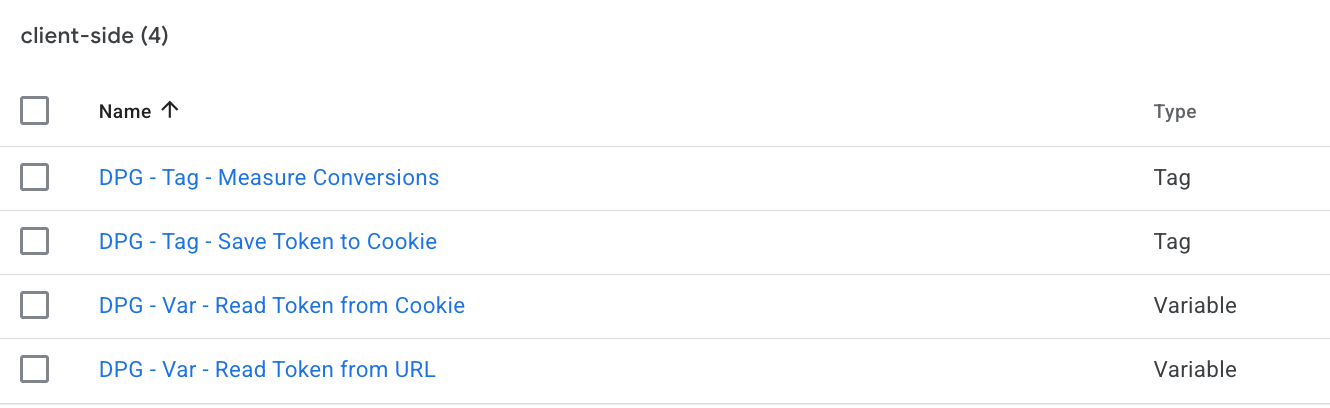
1. Create two variables:
DPG - Var - Read Token from Cookie
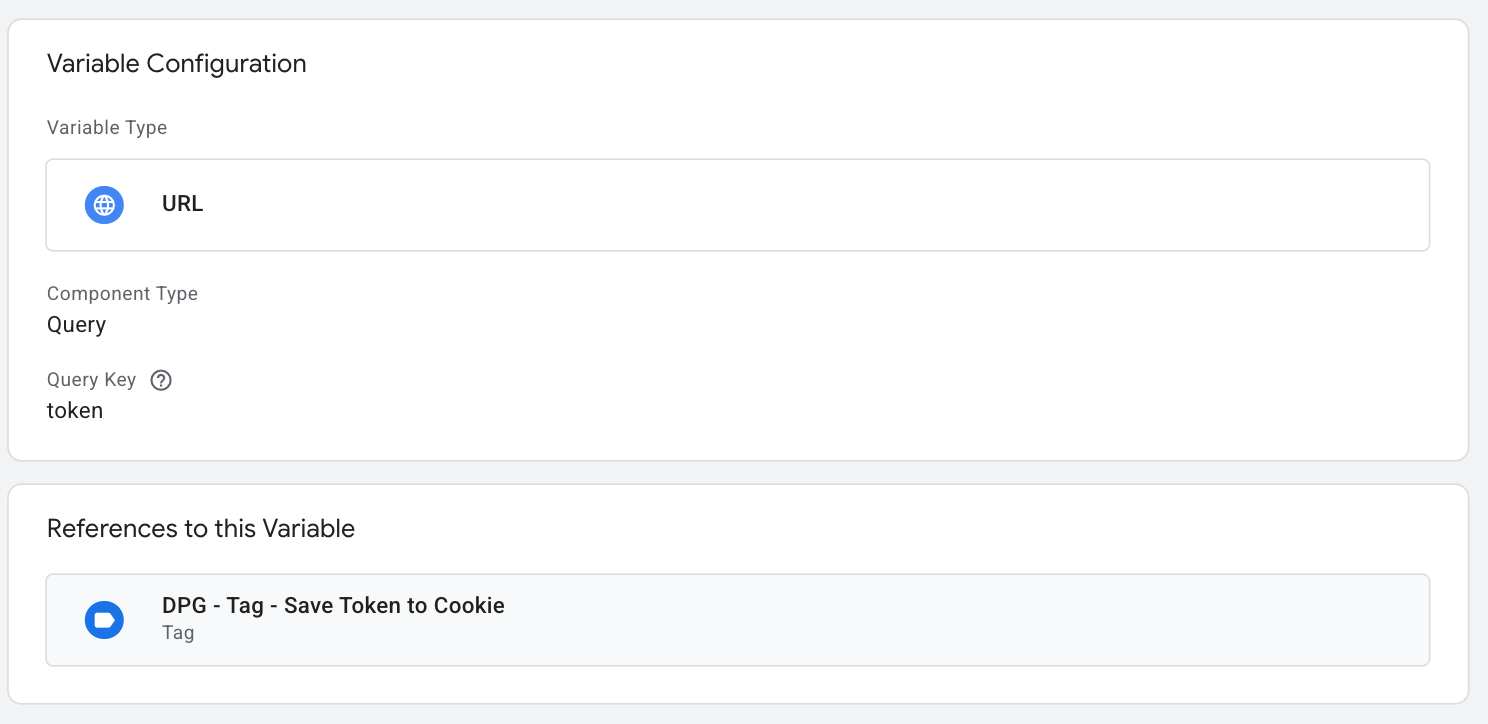
First create a new variable to retrieve the token parameter from the URL.
Create a new ‘URL’ variable and configure the following:
- Component type = Query
- Query Key = ‘token’
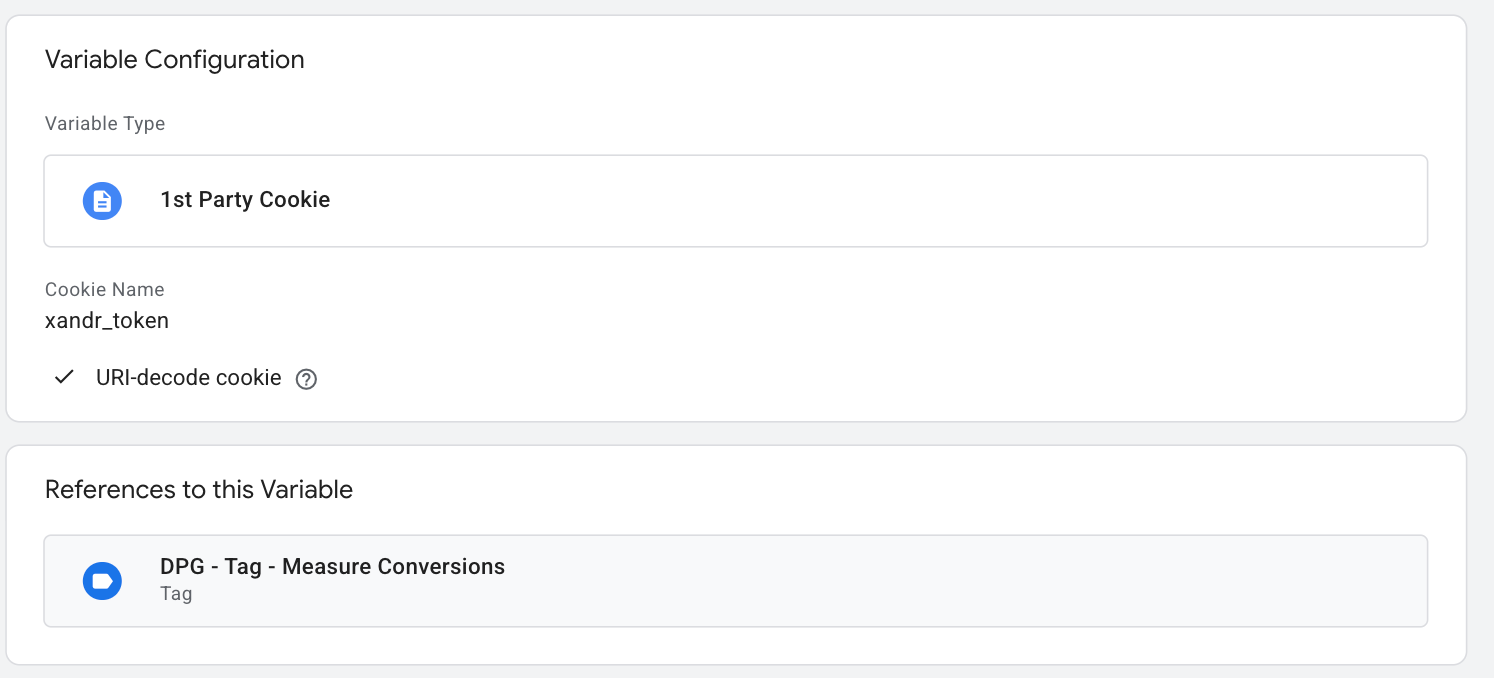
DPG - Var - Read Token from URL
2. Create two tags which store the token to cookie and send the conversion event.
DPG - Tag - Save Token to Cookie
This tag requires marketing consent (of ad_storage when using consent mode).
Create a new tag, type ‘Custom HTML’. This allows the ID to be picked up & set to the cookie and will look like this in GTM. Insert this script:
<script>
(function () {
  'use strict';
  /*
    Example: https://example.com/?token=abc123
  */

  // =========================
  // CONFIG
  // =========================
  var PARAM_NAME = 'token';
  var COOKIE_DAYS = 90;

  // Accept only safe characters
  // Adjust if your token format differs
  var TOKEN_REGEX = /^[a-zA-Z0-9._-]{1,200}$/;

  // =========================
  // HELPERS
  // =========================

  function getUrlParam(param) {
    try {
      var params = new URLSearchParams(window.location.search);
      return params.get(param);
    } catch (e) {
      console.error('[GTM Token Storage] Failed reading URL params:', e);
      return null;
    }
  }

  function isValidToken(token) {
    if (!token || typeof token !== 'string') {
      return false;
    }

    // Trim whitespace
    token = token.trim();

    // Length check
    if (token.length < 1 || token.length > 200) {
      return false;
    }

    // Character validation
    return TOKEN_REGEX.test(token);
  }

  function setCookie(name, value, days) {
    try {
      var expires = '';

      if (days) {
        var date = new Date();
        date.setTime(date.getTime() + (days * 24 * 60 * 60 * 1000));
        expires = '; expires=' + date.toUTCString();
      }

      document.cookie =
        encodeURIComponent(name) + '=' +
        encodeURIComponent(value) +
        expires +
        '; path=/' +
        '; SameSite=Lax' +
        '; Secure';

      return true;
    } catch (e) {
      if ({{Debug Mode}}) {
        console.error('[GTM Token Storage] Cookie write failed:', e);
      }
      return false;
    }
  }

  // =========================
  // MAIN
  // =========================

  var token = {{DPG - Var - Read Token from URL}} || '';

  // Stop if param missing
  if (!token) {
    return;
  }
  token = token.trim();

  // Validate token
  if (!isValidToken(token)) {
    if ({{Debug Mode}}) {
      console.warn('[GTM Token Storage] Invalid token format.');
    }
    return;
  }

  // Store in cookie
  setCookie('xandr_token', token, COOKIE_DAYS);
 if ({{Debug Mode}}) {
   console.log('[GTM Token Storage] Token stored successfully.');
 }
})();
</script>
DPG - Tag - Measure Conversions
This tag requires marketing consent (of ad_storage when using consent mode).
Replace CONVERSION_ID with the ID from Ad Manager.
The param token=${SSP_DATA} needs to be added to the end of the landing page URL!
<script>
  (function () {
    'use strict';

    /*
      GTM Custom HTML Tag
      Purpose: Send a conversion and read click token from cookie
    */

    // CONFIG
    var CONVERSION_ID = 'CONVERSION_ID'; // REPLACE with ID from Ad Manager
    var clickToken = {{DPG - Var - Read Token from Cookie}};
    var BASE_URL = 'https://measurement.dpgmedia.net/display';

    function sanitize(value) {
      return encodeURIComponent(value);
    }

    if (!CONVERSION_ID) {
      if ({{Debug Mode}}) {
        console.warn('[DPG Measurement] Invalid conversion ID.');
      }
      return;
    }

    if (!clickToken) {
      if ({{Debug Mode}}) {
        console.warn('[DPG Measurement] Missing or invalid click token.');
      }
      return;
    }

    // BUILD URL
    // ${SSP_DATA} needs to be add the end of the URL!
    var url = BASE_URL + '?id=' + sanitize(CONVERSION_ID) + '&sspdata=' + sanitize(clickToken);

    // SEND REQUEST
    try {
      fetch(url, {
        method: 'GET',
        credentials: 'omit',
        referrerPolicy: 'no-referrer',
        mode: 'no-cors',
        cache: 'no-store'
      })
      .then(function (response) {
        if (!response.ok) {
          throw new Error('[DPG Measurement] Fetch failed');
        }
      })
      .catch(function (error) {
        if ({{Debug Mode}}) {
          console.error('[DPG Measurement] Fetch failed:', error);
        }
      });
    } catch (e) {
      if ({{Debug Mode}}) {
        console.error('[DPG Measurement] Unexpected error:', e);
      }
    }
  })();
</script>
3. Add triggers to the tags
To save the click token in a cookie, the tag can be executed on consent_update, and when consent for marketing purposes has been given.
To measure the conversion, you can trigger the tag when the conversion event happens AND consent for marketing purposes is given (in case of Consent Mode: ad_storage).
4. Update privacy statement
Your website cookie and/or privacy statement should mention data is shared with Microsoft (Xandr) for marketing purposes. Example text for your website (in Dutch):
ADVERTEERDER maakt gebruik van het advertentieplatform van Microsoft. Binnen dit netwerk worden gegevens in cookies van de webbrowser opgeslagen om het succespercentage van de campagnes te analyseren en op basis hiervan onze campagnes verder te optimaliseren. Er worden door ADVERTEERDER geen persoonsgegevens met Microsoft gedeeld.
Meer informatie over Xandr: https://www.microsoft.com/nl-nl/privacy/privacystatement
Replace ADVERTEERDER with the actual name of the official organisation name.
Was this article helpful?
That’s Great!
Thank you for your feedback
Sorry! We couldn't be helpful
Thank you for your feedback
Feedback sent
We appreciate your effort and will try to fix the article